
ACCOUNT HUB BLOG
Published:
Files · Google Drive · ChatGPT · Multiple accounts · MCP
How to search multiple Google Drive accounts in ChatGPT
Written by the AccountHub team.

Finding a document can mean switching between your work and personal Drive accounts. If you do not remember where you saved it, you may end up repeating the same search.
AccountHub is one way to search multiple Google Drive accounts in ChatGPT. It searches connected accounts that have Drive permission. Start with a familiar document in one account and check that you can open the original. Then add the second account.
For one known location, native Drive search may be enough
Google Drive lets you narrow results by file type, people and modification date. If you know the account, its own search is a straightforward starting point. Google Drive search
If ChatGPT's native integration already covers your documents, use that first. Try AccountHub when you want to search another account's Drive in the same conversation.
| Approach | Useful when | Check first |
|---|---|---|
| Search each Drive directly | You know the account holding the file | Signed-in account and sharing permissions |
| Use your existing ChatGPT integration | It already covers the sources you need | Connection scope in your environment |
| Search through AccountHub | You want connected accounts in one conversation | Drive permission, scope and result source |
Start with a filename you recognize
Follow the connection guide to connect Google and ChatGPT. A connected Google account does not necessarily have Drive permission. Review the requested access and your organization's rules.
“Test document” below is a placeholder. Replace it with a non-sensitive file you can open.
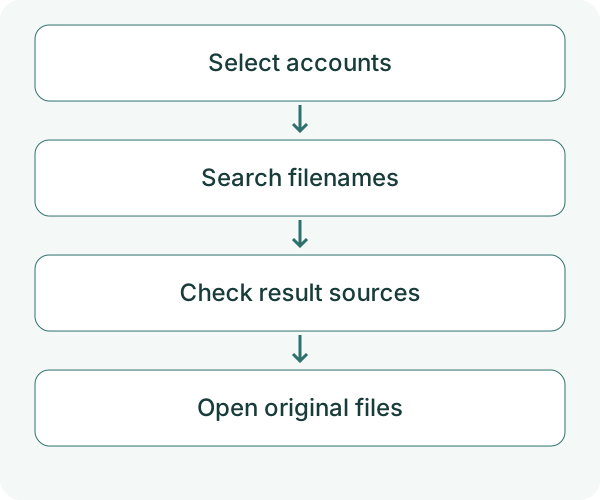
Use AccountHub to check my connected Google accounts. Search only the account I specify for Google Drive files whose names contain “test document.” Search filenames only and retrieve up to five results. Show account, filename, type, modification time and original file link. Do not read file contents or edit anything. Distinguish a failed search from zero matches.
Check the filename and open the link. A familiar document makes it easier to see whether the search found the right file. At this stage, you are checking search results; the AI has not read the contents.
Add another account
After the first check works, connect the second Google account you need. Ask the AI for the account list and use the returned labels.
Using AccountHub, search the two work and personal Google Drive accounts I specify for filenames containing “test document.” Retrieve up to five results per account. Group them by account and show filename, type, modification time and original link. Explain missing permissions or unsearched accounts separately. Do not read contents or change files.
If two files share a name, check the account and the original documents. Modification time can help, but it does not tell you which is the official version.
Read contents only after choosing the file
AccountHub's Drive search returns candidates and metadata such as name, type, modification time and reference links. The search operation itself does not return entire file contents. Matching a keyword against indexed content is also different from retrieving that content for the AI to read.
If you need the contents, select one file before asking for a read. The public AccountHub guide describes Drive access as read-only. Accounts lacking Drive permission may be skipped with a reconnect notice.
Results are fetched one page at a time. If the file is not in the first five results, refine the name or type. You can also narrow the search to one account and ask for the next page.
Check whether this would save account switching
Try finding one familiar document first. If it comes from the right account and you can open the original, try the second account. Using the same question without switching accounts could make your next file search a little easier.
Try one Drive account using the connection guide
---
This is a draft from the AccountHub team, not an article written or approved by Uchiyama. The sample prompts are not results of a personal-account test performed for this draft. Features and sources checked on October 12, 2026.
Read the setup guide
The guide has the connection steps and example requests for your AI.
Read the setup guide →