
ACCOUNT HUB BLOG
Published:
Memory & context · ChatGPT · Claude · MCP · Troubleshooting
AI memory not saved? Check storage before testing recall
You agreed on something with your AI yesterday. Today, you are explaining it all over again. When that happens, check where the note was saved, whether it exists, and whether your current assistant can read it. Those three checks help you find where the handoff stopped.
Written by the AccountHub team. Examples are suggested tests, not reported retrieval results.

Built-in memory may be enough if you work in one assistant. If you want the same decision note in ChatGPT and Claude, you can also keep it outside either conversation. AccountHub lets your own assistants use a stored record and connections such as Gmail.
Where did you ask it to save?
ChatGPT memory, Claude memory, the current conversation and an external record are different locations. Telling ChatGPT something yesterday does not establish that Claude can retrieve it today.
Look back at the request and its result. If you asked for an external save, was a storage location or record ID returned? A sentence saying “saved” is not the same as a verified write result.
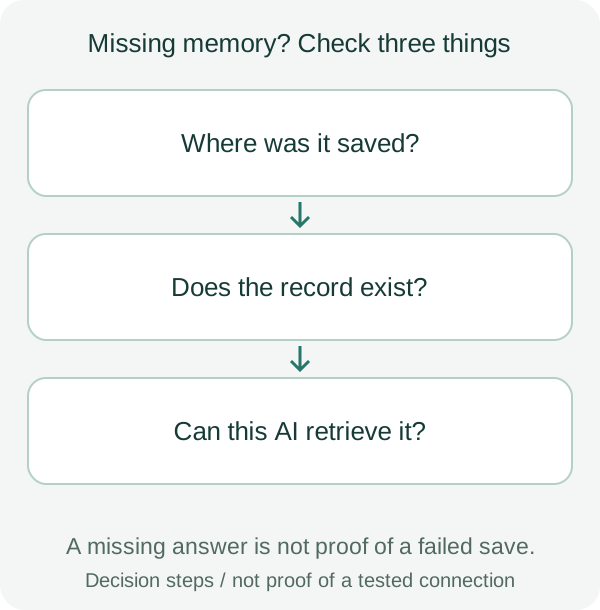
An answer in the same conversation is not proof of storage
The answer may still be in the conversation. Use one harmless test record rather than important personal information:
Save a test note in the storage service I am using: the test phrase is “blue notebook.” Tell me where it was stored and return its record ID if one is available.
This is a proposed test. Not every memory feature exposes an ID. For built-in memory, inspect the available settings and saved content instead.
Check the conversation mode
OpenAI's memory guide says temporary chats do not create or update memories. Check your conversation mode and memory settings.
Claude's memory guide also describes modes that do not retain memory, including incognito chats.
A record existing and an answer using that record are separate checks. Do not assume every saved detail will appear in every response.
For AccountHub, separate storage from search scope
AccountHub lets you save notes, list them and search for them. Its searches can be narrowed by memory space. A zero-result search does not establish that all stored records are absent.
| Check | What it establishes | What to inspect next |
|---|---|---|
| Save result or storage view | Whether a record was created | Its text and location |
| Connected account | Which account is being queried | Whether it matches the saving account |
| Space and date filters | The search scope | Whether the scope is too narrow |
| Retrieved text | Whether the record was read | Whether the answer invented missing details |
This test covers your own assistants reading your own notes. Sharing with another person and receiving notifications require separate setup and verification.
Retrieve one record before saving again
To try AccountHub, connect your assistant using the guide. Ask it to save the test note above in AccountHub and check the save result. Then open a new conversation and ask:
Read the test note saved in AccountHub. Return its text and record ID. If you cannot retrieve it, say so.
If the phrase and record ID match the saved note, you have verified one retrieval. To test another assistant, connect it to AccountHub and make the same request. This does not automatically transfer your entire conversation.
Keep the error and search conditions if retrieval fails. Test one record before re-saving everything or removing every connection.
For a single handoff, copying a verified note yourself may be enough. If you repeatedly pass the same decisions between assistants, use the AccountHub guide to try one save-and-read round trip. Check AccountHub pricing and availability separately from assistant access conditions.
Related reading
Try saving and reading a note
Save one test note, then check its text and record ID in a new conversation.
Try saving and reading a note →Compare memory-sharing options
Compare manual notes and built-in memory for your task.
Compare memory-sharing options →