
ACCOUNT HUB BLOG
Published:
Files · Google Drive · MCP · Comparison
How to find a spreadsheet shared with you last month
Written by the AccountHub team.
Make a candidate list from sharing clues
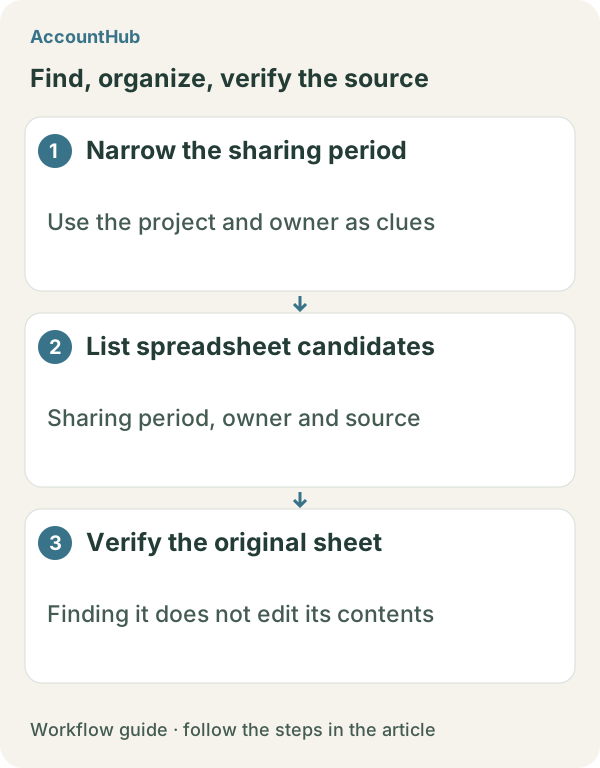
With AccountHub, you can ask an AI to read connected Google Drive metadata and list spreadsheet candidates by sharing period, owner, file type, account, and source. This helps when a sharing notice remains but the filename is forgotten. You can confirm the current link and access before opening a file.
Use Google Drive search first
In Google Drive, filter by spreadsheet type and combine a sharing period, owner, and part of a project name. The Shared with me view may also help. A modified date is not the same as a sharing date, so check owner, location, collaborators, and modified date in the file details. If standard search produces one clear result, stop there.
Read candidate metadata with AccountHub
If sharing notices and files are spread across accounts, connect the required Google Drives to AccountHub. Ask the AI to read candidate metadata and show the account for each result. This article covers locating files. It does not claim to calculate spreadsheet formulas, edit cells, or change sharing settings.
Replace the brackets with the real previous-month dates, owner, and project clue:
Search my connected Google Drives for spreadsheets shared or evidenced by a sharing notice between [last month start date] and [last month end date]. Use [real project name or clue] and [owner or unknown] as hints. Make a table with filename, owner, created date, modified date, visible sharing date, folder, account, and source link. If the sharing date is unavailable, write unknown. Do not calculate or edit the sheet and do not change sharing settings.
What this does and does not establish
A fictional result might show Candidate A as shared last month but no longer accessible, while Candidate B has a sharing notice and is still openable. The table helps locate links, but an unavailable sharing date cannot prove that a file was shared last month. Check access yourself. Formula accuracy and spreadsheet calculations are outside this locating workflow.
Try a small free search
Replace the example fields with the real previous-month period and project, then start with a few safe candidates. AccountHub is free to use, but the in-app AI trial has a daily limit. Google Drive permissions, spreadsheet sharing, and your AI service terms are separate.
This article is an operator explanation based on AccountHub’s official pricing page and guide and Google Drive’s official help. Check AccountHub pricing, the AccountHub guide, and Google Drive search help for current terms.
Start with AccountHub for free. Connect the account you need and try one request through the in-app “Try the AI” entry. To use an external AI assistant, check its connection requirements in the setup guide.
Read the setup guide
The guide has the connection steps and example requests for your AI.
Read the setup guide →