
ACCOUNT HUB BLOG
Published:
Files · Google Drive · Multiple accounts · MCP · Troubleshooting
How to find a Google Drive proposal file when you forgot its name
Written by the AccountHub team.
Put project, date, and owner clues into one list
With AccountHub, you can ask an AI to search connected Google Drives and place project, date, owner, folder, and account clues into one candidate table. This helps when you need a proposal before a meeting but cannot remember whether the file was proposal-final or campaign-v3. After candidates are grouped, you can open the likely source and decide which file to use.
Start with Google Drive’s standard search
Search the Google Drive box with part of the project name or a word likely to appear in the file. Use search options for type, owner, and dates. Google’s help page explains the available filters. Start with a broad date range, then narrow it. A folder name or collaborator can be as useful as the filename. Do not confirm a result from its title alone; check owner, created date, modified date, location, and sharing state in the details. If standard search produces one clear result, that may be enough.
Search multiple Drives with AccountHub
When work and personal files are split across Google Drive accounts, connect only the accounts you need to AccountHub. Ask an AI to read candidates and show account and provenance information. Treat Drive access as read-only. Do not describe the workflow as editing, moving, or changing sharing permissions.
Replace the brackets with your real project, period, and owner:
Search my connected Google Drives for proposal files related to [real project name], created between [start month] and [end month], owned by [owner]. Make a table with filename, owner, created date, modified date, folder, account, and the clue used. Keep duplicate-name or incomplete candidates and do not remove them by guesswork. Do not edit, move, or change sharing permissions.
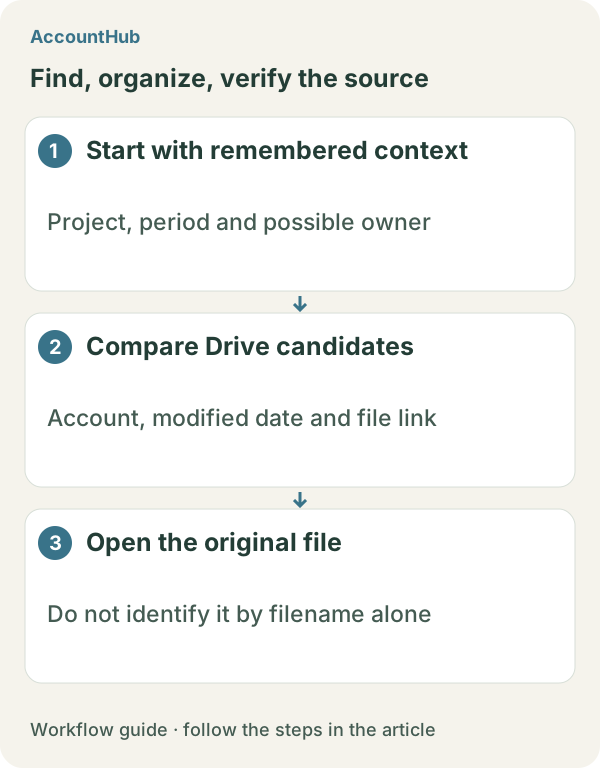
What the result can and cannot prove
A fictional result might list work-drive campaign-plan-final and personal-drive campaign-plan-notes. A newer modified date does not prove approval. If you lack permission to open a file, the candidate list cannot establish its contents or originality. Open the likely links yourself and ask the project owner when the source is still uncertain.
Try a free, narrow search
Replace the example fields with a real project and period, and start with one month of data that is safe to share. AccountHub is free to use, but the in-app AI trial has a daily limit. Google Drive permissions, your AI service plan, and multi-account connection conditions are separate. Keep private or confidential file contents out of saved memory unless needed.
This article is an operator explanation based on AccountHub’s official pricing page and guide and Google Drive’s official help. Check AccountHub pricing, the AccountHub guide, and Google Drive search help for current terms.
Start with AccountHub for free. Connect the account you need and try one request through the in-app “Try the AI” entry. To use an external AI assistant, check its connection requirements in the setup guide.
Read the setup guide
The guide has the connection steps and example requests for your AI.
Read the setup guide →